Updated January 12, 2026
The copy machine is more than just a gathering place to catch up with coworkers - it’s a critical operational tool for small businesses. From printing invoices and contracts to scanning and sharing documents securely, the right copier can directly impact productivity and costs.
With so many models available, choosing the best small business copier can feel overwhelming. In this office printer buying guide, we break down what matters most, explain how we selected our top models, and share our recommendations to help you make a confident, informed decision.
Why investing in a quality copy machine matters
For small businesses, a reliable copy machine helps streamline everyday workflows while keeping costs under control. Modern copiers go far beyond basic copying and printing. They often include scanning, mobile printing, cloud connectivity, and built-in security features.
Investing in a quality copier can:
- Improve employee productivity
- Reduce downtime and maintenance issues
- Enhance document security
- Support remote and hybrid work environments
- Lower long-term operating costs through efficiency and energy savings
How we chose the best copy machines for small businesses
At EO Johnson, we work with businesses of all sizes and industries, giving us firsthand insight into what actually works in real-world office environments. The models selected below were evaluated based on:
- Speed and performance for typical small business print volumes
- Reliability and quality to minimize downtime
- Security features to protect sensitive business data
- Total cost of ownership, including consumables and serviceability
- Scalability, so devices can grow with your business
- Integration with modern workflows, mobile devices, and cloud tools
These criteria ensure each model delivers long-term value, not just attractive specs on paper.
Key copier features to consider when choosing a copy machine
When selecting the best copy machines for small businesses, several key copier features should be considered:
- Print quality: High resolution ensures professional-looking documents
- Speed (PPM): Match output speed to your typical monthly volume
- Functionality: Many copiers are multifunctional devices that combine printing, scanning, faxing, and copying
- Connectivity: Mobile and cloud printing are essential for today’s teams
- Cost of consumables: Toner and maintenance costs add up over time
- Size and design: Choose a machine that fits your space without limiting capability
If you aren’t sure which copier features you need, here are a few questions to ask yourself.
Five questions to help find the best copy machine for your small business
When selecting the best copy machines for small businesses, several key features should be considered:
Do you need color or black and white?
Marketing and sales teams often need color, while accounting or operations may only require black-and-white output.
How fast do you need it to print or copy?
Pages per minute (PPM) should align with how frequently multiple employees will be printing at once.
What paper sizes do you use most?
If legal-size is your largest document, you may not need 11x17” capability.
What are your security and networking needs?
Remote employees, multiple locations, and compliance requirements make built-in security essential.
Where will the machine be located?
Space constraints and accessibility should factor into your decision.
Our top picks for the best small business copiers
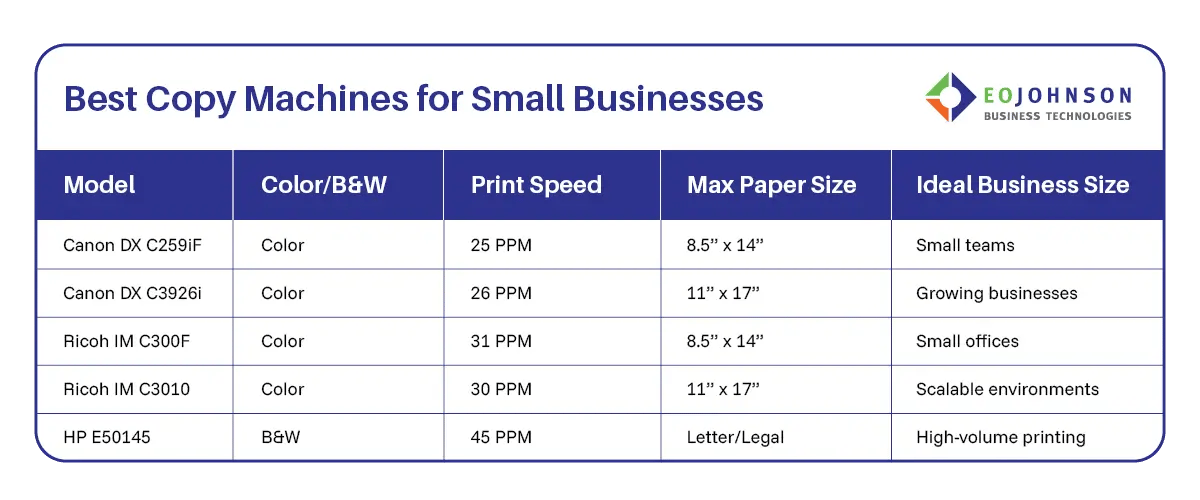
The copiers on this list have similarities with some of their key features like data security and mobile printing options that we know are often a necessity in today’s small business environments. But they differ slightly in some of their capabilities. Depending on your needs, we feel confident one of these top picks will enhance your small business operations.
1. Canon Image Runner Advance DX C259if
The Canon Image Runner Advance DX C259iF was designed for small to medium-sized businesses. It’s a space-saving multifunction solution that doesn’t compromise on features.
Key Features:
- Fast print speeds up to 25 PPM
- Advanced security features including user authentication and secure printing
- Easy mobile printing options
- Will handle up to 8.5x14” legal-sized paper
This model excels in both performance and security—making it one of our top recommendations for businesses that need a reliable and secure color printing solution in a space-saving design.
Best for: Small teams needing secure, space-saving color printing.
2. Canon Image Runner Advance DX C3926i
For those who need a reliable color printer with advanced document handling and security features, the Canon Image Runner Advance DX C3926i is an excellent choice. It offers similar features to the C259if previously mentioned, but it’s designed for slightly higher volumes and enhanced integration with larger group workflows.
Key Features:
- Fast print speeds up to 26 PPM
- Advanced security features including user authentication and data encryption
- Easy mobile printing and additional finishing options
- Will handle up to 11x17” sized paper
This model is one of our top picks for businesses that need a dependable and secure color printing solution with advanced document management capabilities.
Best for: Businesses with moderate-to-high color printing needs.
3. Ricoh IMC300F
For those who need a compact yet powerful multifunction color printer, the Ricoh IM C300F is a great choice. It has a small footprint but is one of the fastest in its category for small to medium-sized businesses.
Key Features:
- Fast print speeds up to 31 PPM
- Advanced security features including user authentication and secure print release
- Easy mobile printing options via Ricoh Smart Integration
- Will handle up to 8.5x14” legal-sized paper
This compact model offers scalable document handling that can grow with your business needs.
Best for: Small offices that need speed without a large footprint.
4. Ricoh IM C3010
With flexible document management solutions, the Ricoh IM C3010 is designed for businesses that may need to scale their operations. It’s a versatile option with robust security features and a high-quality output.
Key Features:
- Fast print speeds up to 30 PPM
- Advanced security features including user authentication and data encryption
- Easy mobile printing options
- Additional finishing solutions and paper drawer configurations
- Will handle up to 11x17” sized paper
This model excels in both versatility and security.
Best for: Businesses planning to scale or needing advanced document handling.
5. HP E50145 Single Function Printer
Last, but not least is an efficient black-and-white printing option, the HP E50145 single function printer. It’s ideal for businesses that don’t require color printing but do require high-speed, high-volume printing.
Key Features:
- Fast print speeds up to 45 PPM
- Advanced security features including secure boot and run-time intrusion detection
- Easy mobile printing options
- Smaller size fits into tight spaces
This model excels in size and speed.
Best for: High-volume, black-and-white printing environments.
The best small business copier is the one that serves your needs
Choosing the right copier can significantly impact your business operations by enhancing productivity while keeping costs manageable. To find the best copy machine for your small business, you first must take a hard look at your organization’s needs. We hope this office printer buying guide helps you navigate through your options effectively!
Not sure which copier is right for you? As a managed print provider, EO Johnson will conduct an on-site evaluation of your printing needs and workspace. Our team of printer and copier experts will help you find the best copy machine for your small business.