The trade show is nine days out. The booth banner is approved, the brochures are designed, and the print shop's quote just came back with a rush fee and a ship date that cuts it close.
For in-house print teams, that moment is familiar. Marketing wants more pieces, on heavier stock, with tighter brand color, on shorter timelines. The office MFP down the hall wasn't built for that work, and a commercial press is more machine, and more cost, than most in-plants need.
The middle ground is production printing equipment sized for in-plant volumes that can still run the stock, sizes and finishing that marketing materials call for. We’ll take a closer look at five of today's top options and help you determine which one fits your team.
Where office printers fall short for marketing materials
Office MFPs are built for documents. Marketing materials ask for more, and the office printer limitations show up fast:
- Heavy and specialty stock misfeeds or won't run at all, so postcards, covers and direct mail get sent to an outsourced print shop.
- Sheet size stops at tabloid, which rules out banners and long-format brochures.
- Color drifts across a run and from one job to the next, so brand colors on a sell sheet don't match the trade show banner.
- Finishing is limited, which means hand-assembly or outsourcing for booklets.
- Volume ties up a device the rest of the office needs.
- Cost per page is priced for everyday documents, not campaign volume, so color-heavy marketing runs on an office MFP get expensive fast.
The cost isn't just the outsourced invoice. It's rush fees, lost control over timing, and campaigns that wait on someone else's schedule. Production-level printing closes that gap.
What to look for in an in-plant printing solution
Six factors decide whether a press earns its place in your in-plant:
- Volume and speed: enough throughput for campaign peaks without paying for capacity you won't use.
- Substrate range: the stock weights, range of media flexibility, and sheet sizes your marketing materials actually call for.
- Color quality and consistency: resolution and color management that keep brand colors steady across long runs.
- Finishing: whether you get finished booklets or a stack of sheets to assemble.
- Operating cost and site needs: cost per page, power, ventilation, and floor space.
- Service and support: a press is only productive when it's running, so local service matters as much as specs.
What are the best in-plant printing solutions for marketing teams?
The best in-plant printing solution is a production press matched to your monthly volume, the stock you run, and the finishing you want to keep in-house. For most marketing teams, that's one of these five, listed from entry-level light production to high volume.
How we chose these: These five picks reflect our production print team's current recommendations from the Canon, Ricoh and Kyocera lines we carry, covering the range in-plants ask us about, from a first step off office MFPs to high-volume color.
1. Ricoh Pro C5400S / C5410S: entry-level light production
Our pick for: teams moving off office MFPs for the first time.
This is a good natural first step. With optional vacuum-feed trays, it runs heavy stock up to 360 gsm, so postcards, covers and direct mail that jam office devices can stay in-house. It also prints sheets up to about 51 inches long, which brings short banners and tri-fold brochures back from the print shop.
2. Canon imagePRESS V900 Series: entry-to-mid production
Our pick for: in-plants that expect volume to grow.
The V900 comes in 70, 80 or 90 ppm, so you can match the press to today's volume and upgrade speed later instead of paying for capacity up front. Its 2400 x 2400 dpi output delivers near-offset quality color on brochures, sell sheets and event collateral. With inline booklet finishers, your team will improve efficiency by creating saddle stitched books as well as flat sheet jobs without any manual intervention.
3. Canon imagePRESS V1000: mid-production, quality-focused
Our pick for: teams whose brand standards leave little room for color variance.
The V1000 brings commercial print quality to in-plant volumes. It handles stock from 52 to 400 gsm, so premium covers and cards stay in-house. PRISMAsync or Fiery color management and up to 11,100 sheets of paper capacity keep long jobs consistent with less operator time spent babysitting the press.
4. Ricoh Pro C7500: mid-production with specialty color
Our pick for: marketing teams that want embellishment without outsourcing.
A fifth color station adds white, clear, gold, silver, neon pink, neon yellow or invisible red. That opens up metallic accents on invitations, white ink on dark stock and spot-clear highlights, the high-impact pieces that usually go to a commercial printer. A media range of 40 to 470 gsm and oversized sheets up to 13 x 49.6 inches cover heavy covers, banners and specialty media.
5. Kyocera TASKalfa Pro 15000c: high-volume color inkjet
Our pick for: in-plants running roughly 150,000 to 2 million pages a month.
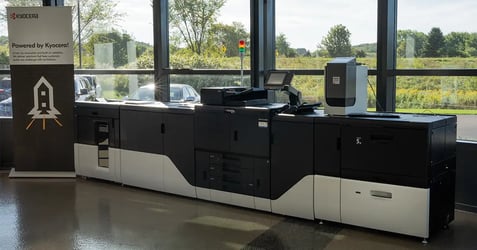
The 15000c prints about 146 ppm (letter) and holds that speed on heavier uncoated media, so mixed-stock jobs don't slow the schedule. Kyocera states it delivers up to 70% lower cost per page and about 70% less energy use than comparable toner systems, which makes high-volume color affordable to produce in-house. It’s ideal for printing color newsletters, statements, and invoices. The 15000c also runs on standard 120V power with no special ventilation, so it fits spaces that weren't built to be a print shop.
How to choose the right fit for your in-house print team
When someone asks which press to buy, Jeff Reuter, EO Johnson's Director of Production Print, doesn't start with equipment.
"I ask, 'What are you sending out today, and why?'" he says. "The jobs going to an outside printer tell you everything from the stocks, the sizes, the finishing, the turnaround and the color expectations. Once we know what work they want to bring back in-house, picking the right press is the easy part."
Here's how to put that into practice:
- Pull six months of outsourced print invoices. List the stock, sizes and finishing on each job.
- Match your monthly volume to the platform range above, with room for campaign peaks.
- Set your must-have media. If heavy covers, long sheets or specialty inks show up often, narrow your list to the platforms that handle them.
- Decide what finishing to bring in-house. Booklets and stapled pieces favor inline finishing.
- Compare total cost, not purchase price. Factor in cost per page, service, power and space.
The equipment is only half the decision: service and support for in-house print teams
"The most common mistake is buying on speed and cost per page and stopping there," Jeff says. "The press is only one piece. If you don't plan for finishing, color management and how jobs get submitted, the bottleneck just moves somewhere else. We see teams double their print capacity and still miss deadlines because everything stacks up at the cutter or the folder. The other one is training. A production press needs an operator who owns it, not whoever happens to walk by."
That's where the right partner matters. EO Johnson is a family- and woman-owned Midwest company that has served businesses since 1957. Our production print specialists and local technicians support in-plants in manufacturing, insurance, healthcare, education, retail, utility companies, and a variety of other industries so your press stays in production instead of waiting on a service call.
Frequently asked questions about in-plant printing
See it run your own work
Bring a piece you outsource today to our Customer Experience Center in Eau Claire, Wisconsin, and watch it print on the platform that fits your volume. Our production print team will help you compare options side by side. Schedule a visit and let’s talk.